Sqlachemy relationships
sqlalchemy is great way to build, manage and use sql databases.
Because i work a lot with flask_sqlalchemy, i'm going to use it. The flask's app is initilized, but then left to be and only the database is used in this demo. Sqlalchemy won't work otherwise,
from flask import Flask
from flask_sqlalchemy import SQLAlchemy

app = Flask(__name__)
app.config['SQLALCHEMY_DATABASE_URI'] = 'sqlite:///:memory:'
app.config['SQLALCHEMY_TRACK_MODIFICATIONS'] = False
db = SQLAlchemy(app)
The sqlite:///:memory: is stored in RAM, so when the script exits, everything is gone.
There is no point in commiting (saving) sessions.
if we were using non-volatile database it is done using db.session.commit()
Single table demonstation
Starting off, we'll create a simple user class, only with name.
class User(db.Model):
    id = db.Column(db.Integer, primary_key=True)
    name = db.Column(db.String(20))

db.create_all()
Here db.create_all function creates all specified tables.
Inserting entries
First we'll have to create some entries. Either one by one using db.session.add or import many of them at the same time using add_all to insert whole list of entries.
the primary_key gets automatically incremented by the database.
db.session.add(User(name='User1'))
db.session.add(User(name='User2'))
db.session.add_all([User(name=f'user{i}')for i in range(3, 9)])
There are many ways to query an item from database. Demonstration of the most common ones:
from sqlalchemy import or_, desc
print([(u.name, u.id) for u in User.query.all()])
print(User.query.all())
print(User.query.order_by(desc(User.name)).all())
print(User.query.limit(2).all())
print(User.query.offset(2).limit(4).all())
print(User.query.first())
print(User.query.get(1))
print(User.query.filter( User.id > 2).all())
print(User.query.filter(or_(User.id >= 5, User.id <= 1)).all())
print(User.query.filter_by(name='user4').first())
[('User1', 1), ('User2', 2), ('user3', 3), ('user4', 4), ('user5', 5), ('user6', 6), ('user7', 7), ('user8', 8)]
[<User 1>, <User 2>, <User 3>, <User 4>, <User 5>, <User 6>, <User 7>, <User 8>]
[<User 8>, <User 7>, <User 6>, <User 5>, <User 4>, <User 3>, <User 2>, <User 1>]
[<User 1>, <User 2>]
[<User 3>, <User 4>, <User 5>, <User 6>]
<User 1>
<User 1>
[<User 3>, <User 4>, <User 5>, <User 6>, <User 7>, <User 8>]
[<User 5>, <User 6>, <User 7>, <User 8>, <User 1>]
<User 4>
Updating entries
For every update to persist you must call db.session.commit.
Entries can be updated either throgh their class instance
usr = User(name='FooBar')
db.session.add(usr)
usr.name = 'JohnDoe'

usr2 = User.query.first()
usr2.name = 'NewName'

#db.session.commit()
or throgh update query, which is ideal for bulk updates as its evaluated inside the database
# User.query.update(User.name == 'new_user')
User.query.filter_by(id=5).update({User.name: 'SomeUser'})
User.query.filter_by(name='user4').update({User.name: 'Old ' + User.name}, synchronize_session='fetch')

print(User.query.filter( User.id == 4).first().name)
print(User.query.filter( User.id == 5).first().name)
Old user4
SomeUser
Deleting entries
Deletion is simillar to the previous tasks.
User.query.filter( User.id == 2).delete()
db.session.delete(User.query.first())
User.query.delete()  # deletes every entry
print(User.query.all())
[]
Tablename
whem working with bare SQLAlchemy, the tablename must be specified, but unless overriden, flask-sqlalchemy does that. The name is derived from the class name converted to lowercase and with “CamelCase” converted to “camel_case”
so the name of the table, where Users are stored is user. You can verify that by printing it from User.__tablename__.
This information will be useful when building relationships
One to Many relationship
bidirectionality allows going from parent to child and back without any extra queries
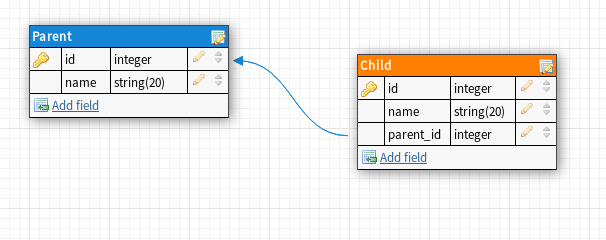
class Parent(db.Model):
    id = db.Column(db.Integer, primary_key=True)
    name = db.Column(db.String(20))
    children = db.relationship('Child')

class Child(db.Model):
    id = db.Column(db.Integer, primary_key=True)
    name = db.Column(db.String(20))

    parent_id = db.Column(db.Integer, db.ForeignKey('parent.id'))
    parent = db.relationship("Parent", back_populates="children")

    def __repr__(self):
        return f'<{self.name}, p:{self.parent}>'

db.create_all()
create one parent with two children
c1 = Child(name='child 1')
c2 = Child(name='child 2')
c3 = Child(name='child 3')
p1 = Parent(name='Father', children=[c1, c2, c3,])
db.session.add_all([c1, c2, c3, p1])
query the parent for the list of it's children, or query the children for it's parrent
p = Parent.query.first()
print(p)
print(p.children)
print(p.children[0])
print(p.children[0].parent)
<Parent 1>
[<child 1, p:<Parent 1>>, <child 2, p:<Parent 1>>, <child 3, p:<Parent 1>>]
<child 1, p:<Parent 1>>
<Parent 1>
To orphan a children, simply set it's parent to None. The parent_id will be automatically set to None too
print('parent: ', Parent.query.first().children)
Child.query.get(1).parent = None
print('parent: ', Parent.query.first().children)
parent:  [<child 1, p:<Parent 1>>, <child 2, p:<Parent 1>>, <child 3, p:<Parent 1>>]
parent:  [<child 2, p:<Parent 1>>, <child 3, p:<Parent 1>>]
or access the children from their parent. The list of children has same methods as normal python list.
print(Child.query.all())
print(p.children.pop(-1))
p.children.remove(c2)
print(p.children)
[<child 1, p:None>, <child 2, p:<Parent 1>>, <child 3, p:<Parent 1>>]
<child 3, p:<Parent 1>>
[]
Now for the changes to propagate you have to call
db.session.expire_all()
print(print(Child.query.all()))
[<child 1, p:None>, <child 2, p:<Parent 1>>, <child 3, p:<Parent 1>>]
None
And the changes are now
Many to One relationship
Is the same as one to many, but with switched parent->child relationship.
Many to many realtionship
it's little trickier to set this relationship.
The easies way to do it is by having another table which holds the infomration about relationships.
class LeftRight(db.Model):
    id = db.Column(db.Integer, primary_key=True)

    left_id = db.Column(db.Integer, db.ForeignKey('left.id'), primary_key=True)
    right_id = db.Column(db.Integer, db.ForeignKey('right.id'), primary_key=True)

    right = db.relationship("Left", backref=db.backref("left_rights", cascade="all" ))
    left = db.relationship("Right", backref=db.backref("left_rights", cascade="all" ))


class Left(db.Model):
    id = db.Column(db.Integer, primary_key=True)
    name = db.Column(db.String(20))
    rights = db.relationship("Right", secondary="left_right", viewonly=True)


class Right(db.Model):
    id = db.Column(db.Integer, primary_key=True)
    name = db.Column(db.String(20))
    lefts = db.relationship("Left", secondary="left_right", viewonly=True)

db.create_all()
The api is almost the same as with one-to-many.
To create rows:
l1 = Left(name='l1')
l2 = Left(name='l2')
l3 = Left(name='l3')

r1 = Right(name='r1')
r2 = Right(name='r2')
db.session.add_all([l1, l2, l3, r1, r2])
To add references:
l1.rights.append(r1)
l1.rights.append(r2)

r1.lefts.append(l1)
r1.lefts.append(l2)
r1.lefts.append(l3)

print(Right.query.all())
print(Left.query.first().rights[0].lefts)
[<Right 1>, <Right 2>]
[<Left 1>, <Left 2>, <Left 3>]